How to Do an SEO Audit: A Practical Guide for Australian Businesses
A practical SEO audit guide for finding technical, content and conversion problems, deciding what matters and turning the findings into an achievable priority plan.

The short answer
Article summary
An SEO audit is a structured review of how easily search engines can access, understand and trust a website, and how effectively the resulting pages help people take action. A useful audit does not produce a long list of warnings. It identifies the constraints that matter, explains their business impact and orders the work into a practical plan.
- Confirm access, crawling and indexing before polishing individual pages.
- Review content against real search intent, not keyword counts alone.
- Treat Core Web Vitals as user-experience diagnostics, not a ranking promise.
- Check measurement and enquiry paths so visibility can be connected to value.
- Prioritise findings by impact, confidence and implementation effort.
- Recheck completed work instead of assuming a recommendation fixed the problem.
An SEO audit should answer a practical question: what is stopping this website from earning useful search visibility and turning that visibility into business?
The answer rarely sits inside one tool. A crawler may find thousands of warnings, while the highest-value problem is an important service page that is not linked from anywhere useful. A performance test may show a slow template, while the larger commercial problem is that the page never explains who the service is for. Good auditing connects technical evidence, search demand, page quality and customer action.
This guide explains how to conduct that review in a sensible order. If you need an independent diagnosis and implementation roadmap, Loom Digital's SEO audit services apply the same principles to the pages and outcomes that matter to your business.
What is an SEO audit?
An SEO audit is a structured assessment of a website's ability to be discovered, crawled, indexed, understood and selected for relevant searches. It also checks whether the pages people reach are credible, usable and capable of supporting a next step.
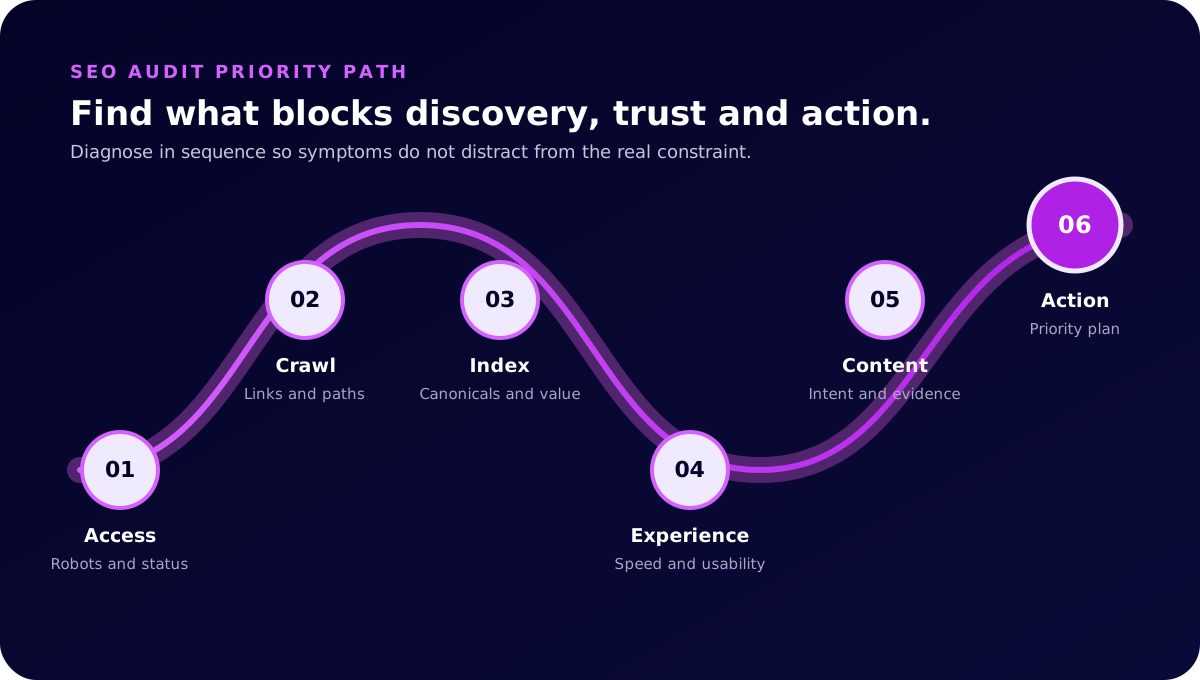
That definition matters because an audit is broader than a technical crawl. Technical checks are essential, but a technically tidy website can still miss the language customers use, compete with itself across several similar pages or send visitors into a confusing decision path. A complete review normally covers six connected areas:
- Access and indexability: whether search engines can retrieve and include the right pages.
- Architecture: how navigation, internal links and URL structure communicate importance and relationships.
- Page experience: whether templates are secure, stable, responsive and comfortable to use.
- Content and intent: whether each page resolves a useful customer question with accurate, distinctive information.
- Authority and trust: whether the business, author and claims are supported by consistent evidence.
- Conversion and measurement: whether valuable actions work and can be measured reliably.
Google's Search Essentials are a useful baseline. They separate technical eligibility, spam policies and practices that help Google understand content. Meeting them does not guarantee crawling, indexing or rankings, but failing a basic requirement can prevent stronger work from being seen.
When should you audit a website?
You do not need to wait for traffic to collapse. Audits are most useful when a decision is approaching or when the available evidence no longer explains performance clearly.
Common triggers include a planned redesign, domain or platform migration, a sustained fall in non-branded visibility, a large content expansion, a change in services, an unexplained drop in enquiries, new competitors or several agencies and developers having worked on the site without one shared technical plan.
An audit is also useful before increasing ongoing SEO investment. It can reveal whether the website is ready to benefit from more content and authority work or whether foundational problems need attention first. For a new build, use the website SEO launch checklist alongside the audit so important pre-launch controls are not left until after deployment.
Prepare the evidence first
Start by defining the website's commercial purpose and the boundaries of the review. A small service website, a multi-location business and a store with thousands of variants do not need the same crawl settings, sampling method or deliverable.
Gather the sources that explain how the site behaves over time. Useful inputs include Google Search Console, analytics, conversion tracking, the content management system, server or hosting information, the XML sitemap, robots.txt, current keyword research and any previous migration mapping. Sales or enquiry information can also reveal which organic landing pages assist valuable work even when they are not the final page before contact.
Record the audit date, tools, crawl settings and access limitations. If analytics only began last month or a staging server cannot be inspected, say so. Clear limits are more useful than confident conclusions built on missing evidence.
Choose representative pages
Large sites do not always require an equal manual review of every URL. Group pages by template and purpose, then inspect representative examples alongside the crawl data. A store might sample category, product, variant, editorial and account templates. A service business might sample the home page, service hub, individual services, locations, industries, articles and enquiry forms.
This approach helps distinguish a template-level fault from an isolated editorial mistake. One missing heading can be fixed locally. The same missing heading across 2,000 products needs a system-level response.
1. Check access, crawling and indexing
Begin with the pages that should generate discovery or support customer decisions. Confirm that they return an appropriate successful status, are not blocked by robots.txt, do not carry an unintended noindex directive and use a canonical URL that reflects the preferred version.
Then compare three sets: URLs the business considers important, URLs included in the sitemap and URLs search engines appear to know about. Differences often reveal orphaned pages, retired URLs that remain discoverable, duplicate variations or new pages that were never connected to the site.
Use Search Console's URL Inspection tool for representative URLs rather than relying on a public site search. Google's guidance notes that URL Inspection is more reliable for debugging a particular URL. When a page is new or materially changed, a crawl can be requested, but Google's recrawl guidance makes clear that requests do not guarantee immediate inclusion.
Status codes and redirects
Review server responses in context. A 404 for a genuinely removed page can be correct. A 200 response for a soft error, an endless redirect chain or a temporary redirect left in place after a permanent migration may confuse both users and crawlers.
Redirects should lead old valuable URLs to the closest genuine replacement, not send every retired page to the home page. Check internal links as well. Visitors and crawlers should reach the final destination directly instead of passing through old hops on every visit.
Canonicalisation and duplicates
Look for multiple URLs serving the same or substantially similar content. Common causes include tracking parameters, print views, filters, inconsistent trailing slashes, HTTP variants, duplicated location copy and products available through several category paths.
A canonical tag is a signal, not a substitute for coherent architecture. Internal links, sitemap entries, redirects and canonicals should point towards the same preferred URL wherever possible.
2. Review architecture and internal links
Site architecture should make the important relationships obvious. A visitor needs to understand where they are, what sits above the page and which related path is useful next. Search engines use many of the same links to discover pages and infer relative importance.
Map the main customer journeys. An SEO service article might link to a relevant service, a supporting technical explanation and a case study. A product category should lead to useful subcategories and products without relying on a search box. Descriptive anchor text is more helpful than repeating generic phrases such as “learn more”.
Check for orphaned pages, deep click paths, oversized navigation, broken breadcrumbs and large groups of near-identical pages. Also review whether links sit inside crawlable HTML. Google's Search Essentials specifically recommends making links crawlable and using descriptive words in link text.
Internal linking is not a mechanical exercise in adding a fixed number of links. Each link should help the reader continue a relevant task. Loom's guide to using specific search demand explains how narrower questions can connect broader topics to practical customer needs.
3. Assess page experience
Review how the site behaves on the devices and connections customers actually use. Check responsive layouts, keyboard navigation, contrast, tap targets, intrusive overlays, secure delivery and layout shifts. Complete several real tasks, including submitting forms, using filters, booking appointments and navigating back from a detail page.
Core Web Vitals provide field metrics for loading, responsiveness and visual stability. The current measures are Largest Contentful Paint, Interaction to Next Paint and Cumulative Layout Shift. Google's page experience guidance cautions against treating one score as the whole experience or assuming a good report guarantees rankings.
Use lab tests to diagnose reproducible problems and field data to understand real visits. A lab test can reveal an oversized hero image or render-blocking script. Field data can show whether the issue affects enough users to warrant immediate attention. Test at template level so one fast page does not hide a slow shared pattern.
4. Audit content and search intent
Every indexable page should have a clear job. Identify the main question or decision it resolves, the audience it serves and the action that becomes sensible after reading it. Pages without a distinct purpose often compete with stronger pages or add crawlable noise.
Compare existing pages with current search demand, but do not turn the audit into keyword insertion. Look at the language customers use, the formats that help them understand the topic and the evidence required for trust. A person comparing SEO audit services needs a different page from someone learning how to run a basic audit internally.
Review titles, main headings, introductions and section structure. Important terms should appear naturally in prominent locations, while supporting questions belong where they help the explanation. Check whether headings describe the answer beneath them, whether definitions arrive before jargon and whether key content is visible without interaction.
Thin, overlapping and outdated content
Thin does not simply mean short. A concise page can completely resolve a narrow task. A long page can remain thin if it repeats generic advice, hides the answer or provides no evidence beyond what every competitor says.
Group pages with overlapping intent. Decide whether they should remain distinct, be consolidated, be redirected or receive clearer boundaries. Review dates and claims against primary sources. Do not change a modified date merely to imply freshness. Update it when the substance changes.
If content needs a larger strategy rather than isolated edits, SEO content and copywriting should connect topic coverage with real customer decisions.
5. Review authority and trust
Search visibility does not exist separately from reputation. Check whether the site clearly identifies the business, the people responsible for advice and the evidence behind material claims. Contact details, About information, policies, author pages and structured data should describe the same real entities.
Review inbound links and mentions for relevance, not just quantity. Genuine editorial coverage, partnerships, professional profiles, client references and useful resources can support discovery and trust. Manufactured links, unrelated directories and anchor-text schemes create risk without improving the customer experience.
On the page, cite original or authoritative sources for factual claims. Distinguish verified client outcomes from illustrative examples. Make dates and measurement periods visible where results are discussed. Loom's guide to earning useful backlinks explains why defensible authority is built through work worth referencing.
6. Check conversion and measurement
An audit is incomplete if it stops at rankings. Test every important action on mobile and desktop. Confirm forms validate correctly, success messages appear, notifications arrive, bookings complete and fallback contact methods are usable. Look for unnecessary fields, confusing labels and calls to action that appear before a reader has enough context.
Then verify measurement. Analytics should record the right pages and events without duplicating tags or collecting inappropriate personal information. Search Console and analytics answer different questions, so use them together. Search Console explains search exposure and clicks, while analytics and enquiry systems help connect landing pages with later behaviour.
Agree on the outcomes that matter before recommending more reporting. Qualified enquiries, bookings, purchases and assisted customer journeys are more useful than a dashboard filled with disconnected impressions.
Turn findings into priorities
The deliverable should separate observations from decisions. For every material finding, record the evidence, affected templates or URLs, likely customer and search impact, recommended action, owner and validation method.
A simple priority model considers four factors:
- Impact: how much discovery, usability or conversion could improve.
- Confidence: how strongly the evidence supports the diagnosis.
- Effort: the time, access and coordination required.
- Dependency: whether other work relies on this issue being resolved first.
Critical access problems normally come before title refinements. A broken enquiry form can take priority over an editorial opportunity. A template improvement affecting hundreds of useful pages may outrank a perfect rewrite of one low-value URL.
Group the roadmap into immediate safeguards, near-term improvements and longer-term growth work. This makes the audit usable by business owners, developers, writers and specialists without forcing everyone to interpret a raw export.
What influences SEO audit investment?
The investment depends on scope and complexity rather than page count alone. A five-page website with tracking failures, several previous domains and unclear ownership can require more investigation than a well-structured hundred-page site.
Key variables include the number of templates, JavaScript rendering, eCommerce filters and variants, international targeting, migration history, analytics quality, backlink risk, stakeholder interviews and whether the engagement includes implementation support. The deliverable also matters. A tool export is not equivalent to a prioritised roadmap with evidence, owner-ready actions and a review session.
Before engaging a provider, ask which systems and templates will be reviewed, what access is required, how findings will be prioritised, whether recommendations will be explained in plain English and how completed fixes will be validated. If the business needs strategic guidance alongside diagnosis, SEO consulting can help turn competing opportunities into a focused plan.
What should happen after the audit?
Assign owners and start with the dependency that unlocks the most useful work. Developers may handle rendering, redirects and template performance. Editors may consolidate overlapping pages or improve weak explanations. Business owners may need to verify offers, locations, proof and priorities.
Validate fixes after deployment. Recrawl affected templates, inspect representative URLs, retest enquiry paths and annotate the change date in reporting. Some effects are immediate, such as a repaired form. Search effects depend on crawling, reprocessing, competition and the quality of the resulting page, so avoid promising a fixed timeline.
Finally, convert the audit into a maintenance rhythm. Review Search Console coverage, major templates, important links, analytics and customer journeys at intervals suited to the site's change rate. A one-time audit creates a baseline. Ongoing attention prevents the same problems quietly returning.
If you want the audit completed independently, explore Loom Digital's SEO audit service, technical SEO services or broader SEO services for Australian businesses. The useful outcome is not a perfect score. It is clarity about what to fix, why it matters and what can wait.
Build an evidence matrix, not a warning list
A crawler, analytics platform and search report describe different parts of the same website. Do not treat any one export as the audit. Put material findings into an evidence matrix that shows what was observed, how it was confirmed and what business outcome may be affected.
For example, a crawler may report that a service page has few internal links. Search Console may show the page receives impressions but rarely earns clicks, analytics may show that the visitors who do arrive often enquire, and the navigation review may reveal that customers cannot reach it from the main service hub. Together, those signals support a stronger recommendation than the crawl count alone.
Use three evidence levels. Confirmed findings have direct technical or behavioural proof, such as a broken form or an unintended noindex directive. Probable findings have several supporting signals but need a live test. Exploratory opportunities are sensible hypotheses, such as a new comparison guide, that should be validated through customer and search research before a large investment.
Interview the people closest to the customer
Search data cannot explain every commercial detail. Ask sales staff which enquiries are valuable, which questions delay a decision and which services are regularly misunderstood. Ask customer service where expectations fail. Ask the person who edits the site which changes are difficult or risky. These conversations often reveal why a technically valid page remains unhelpful.
Record constraints as part of the evidence. A recommendation to publish weekly is not practical when facts require several legal approvals. A plan to create location pages is weak when the business cannot genuinely serve or support those locations. Good auditing produces a roadmap the organisation can actually maintain.
Which SEO audit tools do you need?
The toolset should match the question. Google Search Console helps investigate search exposure, indexing signals and specific URLs. An analytics platform helps examine landing-page behaviour and completed actions. A crawler helps find repeatable technical and on-page patterns. Performance tools help diagnose loading and interaction problems. Backlink data can reveal valuable external destinations and suspicious patterns that deserve closer review.
Tools do not agree perfectly because they collect different data at different times. Crawl totals can differ from sitemap totals, indexed-page reports and analytics landing pages without one source being automatically wrong. Reconcile the definitions and dates before treating a difference as a fault.
Free tools can support a useful review of a small site, but scale and complexity change the work. Large catalogues, JavaScript rendering, international variants and long migration histories need careful crawl controls, representative sampling and specialist interpretation. The expense is not simply access to software. It is the time required to distinguish a meaningful constraint from a harmless variation.
Example SEO audit roadmap
Imagine an Australian professional-services website with declining non-branded enquiries after a redesign. The audit finds that several established service URLs redirect through two hops, the new service hub links only to three of seven services, form submissions are not recorded in analytics and the strongest guide has lost its contextual service link.
The first week should repair measurement and confirm every enquiry reaches the correct team. The second should update internal links and remove redirect chains so users and crawlers reach the final service pages directly. The next content sprint should restore the useful guide-to-service journey, clarify the four underlinked services and consolidate any pages competing for the same intent.
After deployment, the team should recrawl the changed URLs, submit representative pages for inspection where useful, test forms again and annotate the release date. Over the following weeks, review impressions, clicks, qualified enquiries and affected landing pages. A change in one metric is a prompt to investigate, not proof that one recommendation caused the entire result.
This example shows why sequencing matters. Publishing more articles before repairing access, navigation and measurement would make the site larger without making it easier to evaluate. A practical audit creates shared order: safeguard revenue, restore technical clarity, improve the pages that already matter, then expand into validated opportunities.
When is an SEO audit complete?
The investigation is complete when every material recommendation has traceable evidence, an affected scope, a priority, an owner and a validation method. It should also identify what could not be verified because of missing access or data.
The improvement work is complete only after the selected fixes are deployed and checked. Keep those two milestones separate. An approved report does not repair the website, and a completed ticket does not prove the intended customer or search outcome now works.

Written by Jayden
Founder, SEO specialist and web designer
Practical advice from the person planning, building and reporting on the work at Loom Digital.