
eCommerce SEO: How Online Stores Build Sustainable Organic Growth
A practical guide to eCommerce SEO covering store architecture, category and product pages, product data, technical controls, content, authority and measurement.

The short answer
Article summary
eCommerce SEO helps an online store make its categories, products and buying information discoverable for relevant searches. Sustainable growth comes from crawlable architecture, useful category and product pages, accurate product data, strong technical controls and a shopping experience that gives customers enough confidence to purchase.
- Build a crawlable hierarchy from departments and categories to products.
- Give category pages a real purpose beyond displaying a product grid.
- Use original product information that resolves comparison and trust questions.
- Control filters, variants, canonicals and discontinued products deliberately.
- Keep product structured data and Merchant Center information accurate.
- Measure organic revenue and assisted journeys, not rankings in isolation.
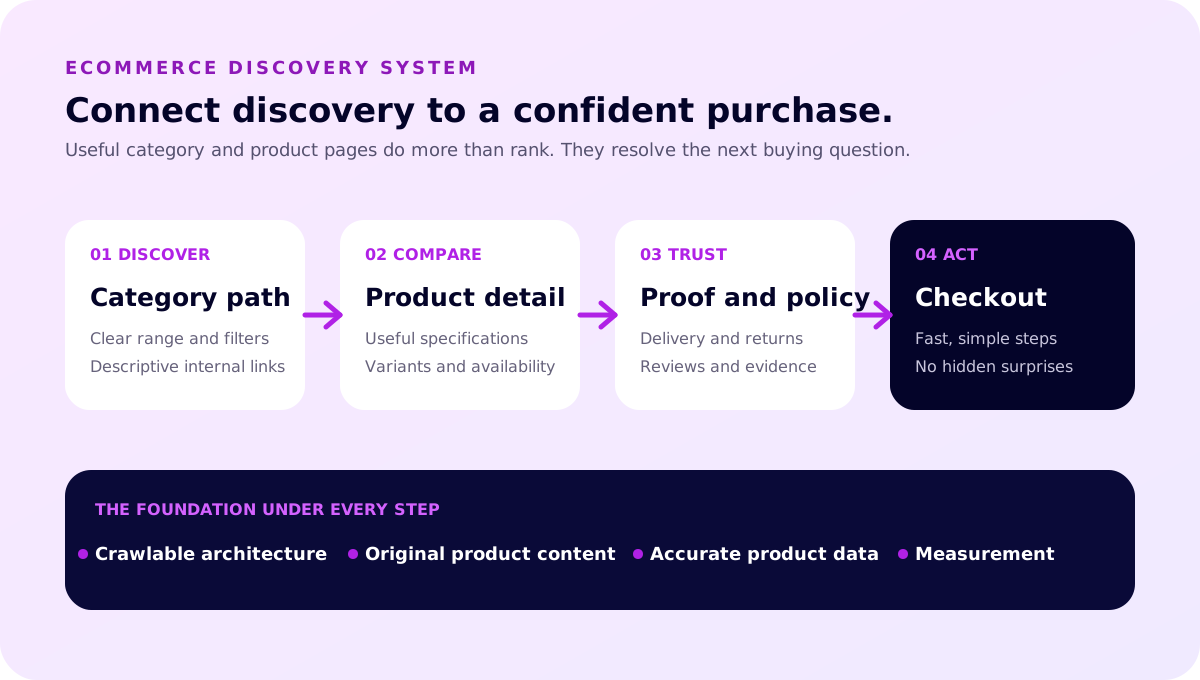
eCommerce SEO is not a project that happens after a store has been built. Architecture, product data, merchandising, content and technical controls all influence whether products can be found and whether shoppers feel confident enough to buy.
The strongest strategy connects organic discovery with the commercial journey. A category page helps someone understand the range. A product page answers comparison questions. Delivery, returns, availability and reviews reduce uncertainty. The checkout makes the final action simple.
This guide explains those connections for Australian stores. Businesses that need ongoing strategy and implementation can explore Loom Digital's eCommerce SEO services, while stores planning a new build can start with custom eCommerce website design.
What is eCommerce SEO?
eCommerce SEO is the work of making an online store's relevant pages accessible, understandable and useful for unpaid search discovery. It covers traditional technical and content foundations, but applies them to product catalogues, variants, filters, categories, stock changes and transactional customer journeys.
A store may need to appear for broad category searches, specific product names, attributes, problems, comparisons and questions. Those searches sit at different stages of intent. The site needs a deliberate page for each valuable job rather than creating a separate URL for every possible phrase.
Organic visibility is only part of the result. A page that ranks but hides delivery information, uses unclear images or makes variant selection difficult can still fail commercially. Useful eCommerce SEO therefore crosses search, merchandising, design and conversion.
Why eCommerce SEO matters
Paid campaigns can create immediate reach, but they stop when the campaign stops. Organic landing pages can continue attracting relevant discovery when they remain useful, technically sound and competitive. That does not make the traffic free. Stores still invest in the platform, content, product data, authority and maintenance.
SEO also improves how a catalogue is organised. The process forces decisions about categories, naming, duplication, internal links and discontinued items. Those same decisions help customers browse and help teams manage the store.
For a real example of search, product education and store experience working together, see the Guiya Minerals eCommerce case study. The Oaky Creek Farm project shows a different journey connecting local discovery, bookings and online farm sales.
1. Build a crawlable store architecture
Start with the range customers understand. A typical hierarchy moves from the home page to departments or primary categories, then subcategories where needed, and finally products. Avoid adding levels simply because the platform supports them.
Important products and categories need ordinary HTML links from relevant pages. Do not rely only on an internal search box or JavaScript interaction. Google's guidance on eCommerce site structure recommends ensuring pages are reachable through navigation and notes that links help Google infer relative importance.
Use descriptive link labels. “Women's linen shirts” communicates more than “view collection”. Add breadcrumbs that reflect the real hierarchy and help people move back to a useful category.
Design categories around customers, not databases
A catalogue may contain internal attributes that make sense to staff but not shoppers. Keyword and customer research can reveal how people group products, which attributes influence choice and where a dedicated category would be useful.
Do not create a category for every filter combination. A category deserves an indexable page when it represents meaningful demand, contains a useful range and can provide information beyond a thin list of products.

2. Make category pages useful
Category pages often have the strongest opportunity to match non-branded commercial searches. Give each page a clear title, short orientation, useful filtering, sensible default order and access to the products that define the range.
Supporting copy should help rather than delay shopping. Explain distinctions, materials, sizing, compatibility, use cases or selection criteria close to the product grid. Longer buying guidance can sit below the grid or in a linked guide when that creates a better reading experience.
Review empty and thin categories. A temporary empty range may need a helpful availability message and alternatives. A category retired permanently may need a redirect to the closest useful successor. Do not leave customers on a page that promises products and provides no path forward.
3. Build product pages around decisions
A product page should describe the specific item, not repeat a supplier paragraph found across many retailers. Original information can cover the problem it solves, who it suits, materials, dimensions, care, compatibility, included items and limitations.
Use clear images that represent the actual variant. Keep price, availability, delivery and return information consistent. Make selectable options understandable and do not hide a critical limitation at the end of a long accordion.
Customer questions are valuable content inputs. If buyers repeatedly ask whether a product fits a particular model, how a shade appears or how sizing works, answer that on the page and improve the supporting visual. This is more useful than adding generic paragraphs to hit a word count.
Reviews and customer content
Genuine reviews can resolve uncertainty and add language customers naturally use. Moderate spam, disclose incentives and never manufacture reviews. Product ratings and review markup must reflect visible, eligible content and follow the relevant platform and search guidelines.

4. Control variants, filters and duplicates
Filters help shoppers narrow a range, but they can also create thousands of crawlable URL combinations. Decide which filtered views deserve indexable landing pages and which should remain user controls without becoming search destinations.
Product variants need consistent handling. Separate URLs can make sense when a variant has distinct demand, content and availability. A canonical relationship may be more appropriate when the difference is minor. Google's eCommerce URL guidance recommends consistent use of preferred URLs across internal links, canonicals and sitemaps.
Audit pagination, sort parameters, session IDs, campaign tags and faceted navigation. The objective is not to block every parameter. It is to give crawlers a stable route to the useful catalogue without spending attention on endless duplicates.
Handle discontinued products deliberately
If a product is temporarily unavailable, keep the page useful and show honest availability. Suggest close alternatives where appropriate. If it will never return, decide whether the page retains value through links, information or recurring demand.
A retired product with a direct replacement may redirect to that replacement. A page with no substitute or remaining value can return a genuine 404 or 410. Redirecting every discontinued product to a broad category can frustrate customers and obscure what happened.

5. Keep product data accurate
Product structured data can help Google understand information such as product identity, offers, price and availability. It must match the visible page and remain current. Google's merchant listing documentation recommends validating markup and ensuring product pages are accessible for crawling.
Merchant Center feeds can complement on-page data. Keep identifiers, currency, price, stock, shipping and returns aligned across the store and feed. A technically valid feed with conflicting landing-page information still creates a poor customer experience.
Structured data improves understanding and eligibility for supported appearances. It does not guarantee a rich result or a ranking. Use it to describe real information, not to make claims the page does not show.
6. Strengthen the technical foundation
Stores place unusual demands on performance and crawling. Large images, third-party apps, personalisation, reviews, recommendations and tracking can make product templates heavy. Measure representative category, product, cart and content pages rather than testing only the home page.
Ensure important content is present in rendered HTML, mobile layouts are complete and stock or price changes do not break caching. Protect account and checkout areas from indexing where appropriate while keeping public product information accessible.
Check XML sitemaps, canonicals, status codes, internal links and international settings. If the store changes platform or URL structure, use a dedicated SEO migration plan rather than treating redirects as a final launch task.
7. Earn relevance beyond product pages
Product and category pages cannot answer every research question elegantly. Buying guides, comparison pages, care instructions, sizing resources, original demonstrations and expert articles can help customers before they are ready to choose a product.
Connect editorial content to the catalogue with descriptive links. A guide to selecting a material can link to the relevant category and a few appropriate products. Product pages can link back to care or compatibility advice. Keep the journey helpful rather than turning every paragraph into a sales pitch.
Authority also grows beyond the site through useful products, partnerships, editorial coverage, creators, associations and customer communities. Avoid manufactured link schemes. Relevant mentions and links should make sense even if ranking systems were not involved.
Do stores need SEO and paid search?
Many stores benefit from both because the channels solve different timing and targeting problems. Paid search can test offers, reach high-intent demand quickly and support seasonal launches. SEO builds useful landing pages and discovery across a wider set of questions over time.
Use shared evidence. Paid-search query data can reveal language and product demand. Strong organic guides can improve campaign landing experiences. Merchant and product data should remain consistent across channels.
Avoid forcing a false either-or decision. The right mix depends on margins, repeat purchase, competition, stock, seasonality and the store's ability to create and maintain useful pages.
Which eCommerce platform is best for SEO?
There is no universally best platform. Search performance depends more on how the platform is configured, the quality of the store and the team's ability to maintain it than on the logo in the footer.
Evaluate control over URLs, canonicals, redirects, metadata, structured data, navigation, faceted pages, sitemaps, performance and content. Also consider product management, integrations, checkout, security, support and the skills available internally.
Shopify website design can suit teams wanting a managed commerce ecosystem. WooCommerce website design can provide deep WordPress flexibility when hosting, updates and extensions are managed carefully. The best choice is the one that supports the business model without making everyday search and merchandising work unnecessarily difficult.
How to measure eCommerce SEO
Track organic revenue, transactions, qualified product views and assisted journeys alongside impressions, clicks and rankings. Segment branded and non-branded discovery where useful. Review performance by template, category, device and new versus returning customer.
Measurement needs context. A category can lose clicks because demand changed, competitors improved, tracking failed, products went out of stock or the average position fell. Investigate the sequence before deciding the remedy.
Annotate launches, feed changes, migrations and major catalogue events. Use consistent attribution for trend analysis, but accept that no single model perfectly explains a multi-visit purchase.
A practical 90-day priority plan
Days 1 to 30: establish control
Confirm tracking, catalogue priorities and business constraints. Crawl the store, review Search Console, map indexable templates and find access, duplication or migration issues. Test representative buying journeys on mobile.
Days 31 to 60: improve the commercial templates
Strengthen the highest-value category and product patterns. Improve internal links, product information, image handling, availability messaging and structured data. Resolve template performance issues that affect large parts of the catalogue.
Days 61 to 90: expand useful discovery
Create or improve guides around genuine customer questions. Develop relevant partnerships and promotion. Recheck technical changes, compare leading indicators and plan the next category group from what the evidence shows.
Sustainable eCommerce SEO is a connected operating system, not a collection of keywords. When architecture, product truth and customer confidence reinforce each other, the store becomes easier to discover and easier to choose.

Common eCommerce SEO failures
Stores often lose useful discovery through accumulation rather than one dramatic error. A new filter creates indexable URLs, an app adds duplicate product paths, a seasonal category is removed, and internal links continue pointing through old redirects. Quarterly template and catalogue reviews help catch that drift.
- Copying supplier descriptions: identical text gives shoppers little reason to choose the store and rarely resolves store-specific questions.
- Indexing every filtered view: crawlable combinations expand faster than the useful catalogue.
- Hiding products behind internal search: important inventory receives no stable browse path.
- Removing unavailable products immediately: useful links and recurring demand are discarded without checking alternatives.
- Ignoring category intent: product pages are expected to rank for broad range searches they cannot answer well.
- Adding apps without performance review: scripts accumulate across every product template.
- Separating SEO from merchandising: search pages promote items that are unavailable, poorly explained or commercially unimportant.
Create ownership for categories, product information, technical controls and measurement. SEO recommendations need someone who can change catalogue data and customer journeys, not only metadata. Revisit the priority set as ranges, margins and inventory change.
Turn search demand into a page map
Keyword research becomes useful when it informs catalogue decisions. Group searches by the job a shopper is trying to complete: browse a product type, compare an attribute, find a compatible item, solve a problem, learn how something works or locate a specific brand and model. Then assign each meaningful group to the page best equipped to resolve it.
Broad commercial demand usually belongs to a category or curated collection. Specific model and attribute demand may belong to a product, subcategory or buying guide. Informational questions belong where the answer can be complete without interrupting shopping. Avoid creating several pages for small wording variations when one strong destination can answer the shared intent.
Add commercial evidence before approving a new landing page. Check whether the store carries enough suitable products, whether stock is likely to remain available, whether the range has a healthy margin and whether the team can explain the distinction. A page targeting demand the business cannot satisfy creates maintenance work and customer disappointment.
Plan for seasonal and changing demand
Australian seasons, holidays, delivery cut-offs and regional conditions can change what shoppers need and when. Keep enduring seasonal URLs when the topic returns each year, then update dates, availability and supporting information rather than rebuilding the page at a new address every season. Remove urgent claims when the deadline passes.
Trend demand needs a different test. A fast-growing phrase can justify an editorial explanation or temporary merchandising collection before a permanent category. Watch whether customer interest and stock depth persist. This protects the architecture from expanding around a short-lived query.
Build a product content system
Large stores cannot handcraft every field from scratch, but automation should not flatten meaningful differences. Define a product information model that captures the facts customers repeatedly need: product identity, materials, measurements, compatibility, inclusions, care, origin, warranty, delivery limits and available variants.
Separate verified product data from persuasive copy. Data fields should remain consistent across the page, feed and customer service system. Editorial sections can explain use cases, trade-offs and selection advice in the store's own voice. When a supplier changes a specification, the structured source should make every affected surface easier to update.
Write rules for titles and descriptions that remain readable at scale. Templates can combine product type, distinguishing attribute and brand, but allow manual control for priority pages and unusual products. Do not repeat every taxonomy value simply because it exists in the database.
Use customer questions as product research
Review support tickets, returns, product reviews, site-search terms and sales conversations. Repeated questions signal missing information. A high return rate for sizing may require a clearer measurement guide and images, not a longer general description. Searches for compatibility may require a structured selector and explicit model list.
Answer material limitations as well as benefits. Explaining that an item is unsuitable for a certain surface or requires a separate fitting can reduce unsuitable orders and build confidence. Search content should help the right customer choose, including when the right answer is another product.
Make Australian buying details easy to verify
Shoppers need to understand currency, GST treatment, delivery regions, dispatch timing, returns, warranties and contact options before committing. Keep these details consistent between product pages, policy pages, checkout and advertising feeds. If remote-area delivery or bulky freight has conditions, explain them before the final checkout step.
Do not make legal claims from a generic template. Australian Consumer Law obligations depend on the facts and should be reviewed against current guidance and appropriate advice. The Australian Competition and Consumer Commission publishes consumer rights and guarantees guidance that can help businesses check whether customer-facing explanations are aligned with the current framework.
For stores with physical locations, keep addresses, opening hours, pickup options and service regions accurate across the website and relevant business profiles. Local information should support a real fulfilment experience, not create doorway pages for places the store cannot serve.
eCommerce SEO audit checklist
Review the store by system and by representative journey. A practical audit should cover:
- Discovery: important categories and products are reachable through ordinary links and included in suitable sitemaps.
- Index control: canonical URLs, parameters, filters, pagination and internal search produce intentional outcomes.
- Templates: category and product pages expose useful content, metadata and structured data in rendered HTML.
- Product truth: price, availability, identifiers, variants, delivery and return information agree across visible pages and feeds.
- Experience: images, selection controls, cart and checkout work on representative mobile devices.
- Lifecycle: temporary stock issues, discontinued products, seasonal ranges and replacements have documented rules.
- Content: guides answer pre-purchase questions and link naturally into appropriate categories and products.
- Measurement: product views, cart actions, purchases and organic landing pages are recorded consistently.
Sample priority templates rather than testing the home page alone. Include a best-selling product, a low-stock product, a product with variants, an empty category, a filtered view, an editorial guide and a checkout journey. Template-level defects often affect more revenue than isolated metadata.
Create a useful reporting rhythm
Weekly checks can flag sudden crawling, feed, stock or tracking failures. Monthly reporting can compare organic discovery, revenue and landing-page groups. Quarterly reviews can investigate architecture, content gaps, catalogue drift and template performance.
Segment results by category and intent. A rise in informational clicks may be valuable when guides assist later purchases, but it should not be presented as category growth. Branded demand may reflect campaigns outside SEO. Product availability and discounts can change conversion even when search visibility is stable.
Record releases, catalogue changes and campaigns beside the data. Look for a consistent sequence across impressions, clicks, product engagement, transactions and customer feedback. Sustainable growth is rarely explained by one ranking. It comes from keeping the discovery system, catalogue truth and buying journey aligned as the store changes.
Adjust priorities to the store's business model
A catalogue with thousands of low-consideration products needs different search systems from a specialist store with thirty high-value items. Start with how customers choose, how often inventory changes and where the business earns a healthy return.
Large catalogue retailers
Prioritise taxonomy, index control, product data and template quality. Small errors multiply across many URLs. Define rules for filters, pagination, variants, unavailable items and feeds before rewriting individual descriptions. Use sampling and segmented reporting to find which template or category creates the greatest impact.
Specialist and high-consideration stores
Invest in decision support. Detailed comparisons, compatibility guidance, demonstrations, expert advice and responsive pre-sale help can matter more than catalogue breadth. Make limitations clear and connect educational resources to the exact product or category that resolves the next step.
Manufacturers and wholesalers
Separate the needs of end users, trade buyers, distributors and specification professionals. Product data may need technical documents, model relationships, minimum orders and enquiry paths as well as retail-style descriptions. Avoid creating duplicate pages for every audience when one structured destination can serve them clearly.
Local and appointment-led commerce
Connect products with the real local service. Accurate pickup details, delivery areas, appointments, stock visibility and location information can be central to the decision. Do not build location pages for areas the business cannot genuinely fulfil.
Who should own eCommerce SEO?
One person should coordinate the roadmap, but sustainable improvement crosses several roles. Merchandising owns which ranges matter and how products are grouped. Product teams own accurate specifications, images and lifecycle information. Developers own templates, rendering, performance and index controls. Content teams own guides and page explanations. Marketing and analytics teams connect acquisition with commercial outcomes.
Create a decision log for changes that affect URLs, categories, filters, navigation, feeds and tracking. A developer should not remove a category without knowing its search and customer role. An SEO specialist should not recommend an indexable collection without checking stock and commercial value. A merchandiser should not rename every category without a redirect and internal-link plan.
Brief new products correctly
Make SEO and customer information part of product onboarding. Collect the preferred product name, unique identifiers, attributes, compatibility, dimensions, inclusions, exclusions, images, availability, delivery conditions and related products before publication. Decide where the item sits in the browse hierarchy and which existing guide should link to it.
When a product leaves the range, record whether it is temporary, replaced or permanently retired. That single lifecycle decision guides availability messaging, alternatives, feeds, redirects and customer support. It is much safer than deleting the page automatically when stock reaches zero.
Review operational changes before release
Platform upgrades, app installations, navigation changes and feed migrations can affect every product. Use a production-like test environment, compare representative rendered pages and confirm purchase measurement after release. Keep a recovery route for changes that alter checkout or catalogue routing.
The strongest eCommerce SEO programme is integrated with store operations. It makes useful ranges easier to discover, product truth easier to maintain and buying decisions easier to complete. That is why steady commercial and technical ownership creates more durable value than a one-off metadata project.
Prioritise with commercial context
Score opportunities against demand, product availability, margin, customer value, implementation effort and confidence. A high-volume query is not automatically the best first target when the range is thin or unprofitable. A smaller category can deserve priority when the store has genuine expertise, reliable stock and a strong customer journey.
Review the score with the people responsible for inventory and customer service. Search data can reveal how people ask, while operational teams can explain whether the store can fulfil the promise. Record assumptions and revisit them when suppliers, seasons or margins change.
This commercial filter also prevents content waste. Create a new page only when the store can maintain a useful destination. Otherwise improve an existing category, product or guide that already serves the same decision.
Before approving the next quarter, confirm who will implement each recommendation and how success will be checked. A category rewrite needs merchandising review, a filter rule needs technical testing and a feed change needs product validation. Clear ownership keeps useful analysis from becoming an unattended spreadsheet.

Written by Jayden
Founder, SEO specialist and web designer
Practical advice from the person planning, building and reporting on the work at Loom Digital.